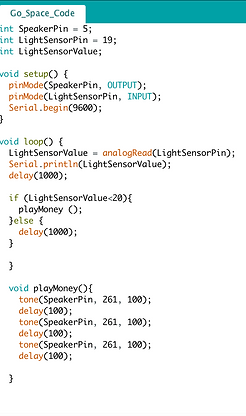
The first code we created was for the GO space. This code would read a light sensor, and if the light sensor was blocked would make a sound to indicate that one should collect the $200 that comes with passing GO.This code began by initializing the necessary pins, then setting the light sensor as an input and the speaker as an output. We were then able to create an if statement which would read the value of the light sensor every 1000 milliseconds, and do one of two things depending on the reading. If the value was above 20, the sensor would simply delay an additional 1000 milliseconds before trying again. However, if the value was below 20 the speaker would sound tone 261 for 100 milliseconds three times.
The second code we create was for the Jail space, and was very similar to the code for the GO space. This code would read a light sensor, and if the light sensor was blocked would make a sound to indicate that one was in jail.This code began by initializing the necessary pins, then setting the light sensor as an input and the speaker as an output. We were then able to create an if statement which would read the value of the light sensor every 1000 milliseconds, and do one of two things depending on the reading. If the value was above 20, the sensor would simply delay an additional 1000 milliseconds before trying again. However, if the value was below 20 the speaker would sound tone 783 for 100 milliseconds, then tone 440 for 100 milliseconds, and finally tone 261 for 100 milliseconds in order to create the desired Jail sound.
The third code we created was for the Cityscape, and was designed to create the effect of twinkling lights within the buildings. The code began by initializing the LEDs as digital pins, then set them all to be outputs. The code then gave each LED a distinct on/off cycle. It digital wrote each code to be on (HIGH) and off (LOW) for unique amounts of time, and it creates the effect of the lights being turned on and off at various times within the buildings. This code utilized the digital pins on the Arduino Lilypad, onto which we could attach multiple LEDs so as to have multiple LEDs turning on and off, some simultaneously and others at different times.